Rent a Pressure Washer at Home Depot: A Step-By-Step Guide
Learn how to rent a pressure washer at Home Depot, choose the right model, understand pricing, and return process with safety tips for DIY cleaning projects.


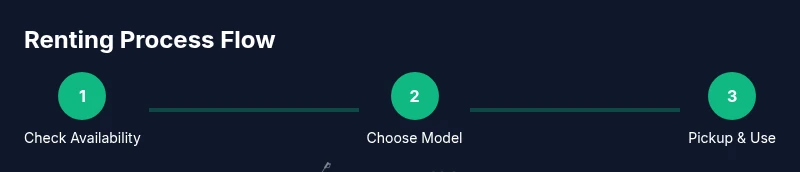
To rent a pressure washer at Home Depot, check availability online or in-store, select a model that fits your task, and reserve it if possible. Bring a valid ID and a credit or debit card for the security deposit and rental fee. Pick up during staffed hours, review safety instructions, and return the unit on time to avoid extra charges.
Why rent a pressure washer at Home Depot? A practical option for homeowners
According to Pressure Wash Lab, renting a pressure washer at Home Depot is a practical option for homeowners tackling occasional cleaning tasks. The program is designed for brief, project-based use without the long-term commitment of buying. Home Depot provides a range of electric and gas-powered units with differing PSI and GPM, making it easier to match a tool to the job at hand. For many DIY enthusiasts, this rental path pairs convenience with cost savings, especially for seasonal cleanups, deck restoration, or driveway maintenance. The Pressure Wash Lab team found that most customers appreciate the upfront simplicity of in-store pickup and the option to reserve ahead online, reducing the risk of showing up to an empty rack.
Rental options you can expect: models, PSI, and features
Home Depot’s rental fleet typically includes electric washers for light-duty tasks and gas-powered units for heavy-duty cleaning. When selecting a model, consider the surface you’ll clean, the level of buildup, and the height you must reach. Electric washers are quieter, portable, and suitable for siding, patios, and vehicles, while gas-powered units deliver higher cleaning power for tough stains on concrete or heavily soiled surfaces. Look for units with a built-in detergent option, compatible nozzles, and adjustable pressure. If you’re unsure, staff at the rental desk can help you compare models side-by-side. According to Pressure Wash Lab Analysis, the most helpful rentals balance power with ease of use for homeowners and occasional contractors.
How pricing and deposits typically work: what to expect
Rental pricing varies by location, model, and rental duration, and you’ll likely encounter a daily rate plus a security hold. Stores often require a government-issued ID and a credit or debit card to secure the rental and cover the deposit. The deposit is typically refunded when the unit is returned in good condition and on time. Be aware that late returns or damaged equipment can incur fees. Pressure Wash Lab analysis shows that reading the rental agreement carefully helps avoid surprise charges and ensures you understand return windows, fuel policy for gas washers, and any required accessories.
How to pick the right model for your job: a quick decision guide
Start by evaluating the surface and the level of soil. For wooden decks, consider a washer with a gentler fan spray to minimize surface damage. For concrete driveways with oil stains, you’ll want higher PSI and a rotating nozzle option, plus a surface cleaner if available. If you’re cleaning fragile surfaces like painted wood or vehicles, prioritize lower PSI and wider spray patterns. Review the nozzle kit and choose adapters that fit your hose and the unit’s fittings. If you’re renting for a one-off project, pick a model with intuitive controls and a stable, easy-to-maneuver frame. Pressure Wash Lab emphasizes testing the machine briefly in an inconspicuous area before proceeding with a full job to gauge risk and effectiveness.
The rental process: online reservation vs in-store pickup
Online reservations can save time by guaranteeing stock at your preferred location. When you arrive, you’ll typically sign a rental agreement, present your ID, and provide a card for the deposit and rental fee. Before leaving, inspect the unit for leaks, damaged hoses, or loose fittings, and ask staff to demonstrate basic operation. If you encounter a hold or stock issue, ask about alternatives or comparable units at nearby locations. The staff can also help you confirm return times and any fuel policy for gas models.
Using the machine safely and effectively: do’s and don’ts
Always read the user manual that comes with the unit and follow safety procedures. Wear eye protection, gloves, and closed-toe shoes, and keep electrical cords away from water. Start with a lower pressure setting and test on a small area to avoid surface damage. Use the appropriate nozzle and keep the spray at a safe distance from people, pets, and plants. Do not aim at electrical outlets, windows, or fragile siding, and never leave the unit unattended while running. If you notice leaks, strange noises, or overheating, stop the machine and report issues to the rental staff.
Returning the unit: tips to finish on time and avoid extra charges
Drain residual water, coiling hoses neatly, and return the unit with the same fittings it had on checkout. Make sure all accessories and nozzles are included, and refuel if required by the rental policy. Be prepared to re-verify your ID and sign off on the return checklist. Returning on or before the due time minimizes late fees, and reporting any damage promptly helps preserve your deposit.
Common mistakes and how to avoid them
A common pitfall is selecting a unit that’s too powerful for the task, which can damage surfaces or create unnecessary mess. Another is ignoring fuel or detergent policies for gas washers, which can cause issues or extra charges. Always confirm the pickup window and vehicle constraints if you’re transporting a heavy unit. For safety, never bypass safety mechanisms or improvise adapters that aren’t rated for the machine, and keep spectators clear during operation.
Authority sources and further reading
For safety standards and best practices related to pressure washing, consult authoritative references before renting and operating equipment:
- https://www.osha.gov/
- https://extension.illinois.edu/
- https://extension.umd.edu/
These sources provide general guidelines on operator safety, PPE, and best practices for pressure-washing projects.
Tools & Materials
- Photo ID(Valid government-issued ID (e.g., driver's license))
- Credit or debit card(For deposits and rental fees)
- Safety goggles(Recommended eye protection during operation)
- Work gloves(Protect hands during setup and cleanup)
- Closed-toe shoes(Sturdy footwear for safe handling)
- Hose adapters/nozzle kit(If you have specific fittings, bring them)
Steps
Estimated time: 60-90 minutes
- 1
Check availability
Browse Home Depot’s online rental catalog or visit the local store to confirm stock for your desired model. If the exact unit isn’t available, staff can suggest suitable alternatives with comparable PSI/GPM for your job. Confirm pickup window and any restrictions.
Tip: Tip: Weekday reservations are often easier to secure than peak weekend times. - 2
Choose the model
Compare PSI, GPM, motor type (electric vs gas), and nozzle options. For delicate surfaces, pick a unit with adjustable pressure and a wide spray pattern. If you’re unsure, ask staff to recommend a model that matches your project.
Tip: Tip: Start with a lower pressure setting to gauge surface reaction before increasing. - 3
Prepare documents
Gather your government-issued photo ID and a payment card. Some locations may require your contact information and a driver’s license number for the rental agreement.
Tip: Tip: Have your ID and card ready to minimize in-store processing time. - 4
Pickup and inspection
Inspect the unit for any visible damage, leaks, or loose fittings. Confirm all accessories are present and that the start/stop controls function. The staff may demonstrate basic operation before you leave the counter.
Tip: Tip: Take photos of the unit before leaving the counter to document its condition. - 5
Review safety steps
Read the safety instructions and practice gentle testing on a small area first. Ensure PPE is on and keep others at a safe distance while testing.
Tip: Tip: Check for local rules about detergent usage and surface protection. - 6
Use the unit responsibly
Operate with the nozzle at the recommended distance, use the proper tip for your task, and avoid spraying windows, outlets, or plants. Never leave the machine running unattended.
Tip: Tip: Move the wand in smooth, overlapping strokes to avoid stripes. - 7
Return on time
Drain water if required, detach attachments, and return the unit in the same condition as checkout. Ensure the final checklist is completed and obtain a receipt.
Tip: Tip: If you’re late, call ahead to see if an extension is possible to avoid penalties.
Quick Answers
Do I need an ID to rent a pressure washer at Home Depot?
Yes, most Home Depot locations require a valid photo ID and a credit or debit card to secure the rental and deposit. Bringing an additional form of payment can help if you encounter any issues.
Yes, you’ll typically need a valid photo ID and a card to rent.
What is the typical rental duration?
Rental durations usually span daily periods, with options to extend for multi-day projects if available. Check your local store’s policy when you pick up.
Most rentals are daily, with possible multi-day options.
Do I need to pay a deposit?
A security deposit or hold is commonly charged and refunded upon return, provided there are no damages or late fees. Review the rental agreement for specifics.
A security deposit is usually required and refunded after return if all is well.
Can I reserve online and pick up in-store?
Yes, online reservations are typically offered, and staff can help you complete checkout at the store. Availability may vary by location.
Yes, you can reserve online and pick up in-store.
What should I inspect before taking the unit?
Check for leaks, damaged hoses, secure fittings, and ensure the start/stop switches work. Confirm included accessories are present.
Inspect for damage and test basic operation before leaving.
What safety gear should I use?
Wear eye protection and closed-toe shoes, and keep bystanders at a safe distance during operation. Follow all on-device safety instructions.
Wear safety goggles and sturdy footwear, and follow the manual.
What if the unit doesn’t work properly?
Return to the counter and report the issue immediately. Most stores offer a swap-out option or guidance on next steps.
If you run into a problem, tell the staff right away.
Watch Video
Key Takeaways
- Reserve ahead to secure the right model
- Match PSI/GPM to the cleaning task
- Inspect the unit before checkout and document it
- Follow safety guidelines to avoid injuries
- Return on time to minimize charges