Why is My Pressure Washer Overheating? Troubleshooting Guide
Struggling with a hot-running pressure washer? This Pressure Wash Lab guide walks you through common causes, quick fixes, and long-term prevention to keep your unit cool and efficient.


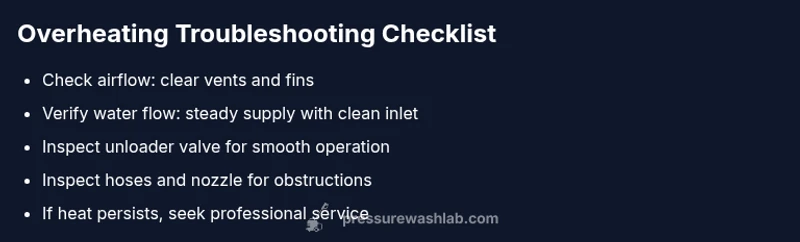
Most overheating on a pressure washer is caused by restricted cooling airflow or low water supply. Quick fix: power off and unplug, clean the air intake and vents, and ensure a steady water flow; recheck the nozzle and unloader valve before testing under light load. If heat persists, stop and seek professional service.
What overheating looks like
According to Pressure Wash Lab, overheating can present as the motor or pump running hot to the touch, a noticeable decline in spraying power, intermittent pressure drops, or a thermal shutdown on modern units. Homeowners often notice a buzzing motor, a smell of hot plastic, or steam escaping from vents. The issue is rarely sudden and usually builds as the unit operates under load, especially with restricted cooling air or poor water flow. Understanding these signs helps you act quickly to prevent internal damage and to avoid unsafe operation. While some models have thermal protection, continuous overheating can shorten pump life and degrade seals, so early identification is key. If you see consistent heat symptoms, begin with the simplest checks first and escalate if needed.
Primary causes at a glance
The main culprits are airflow restrictions, inadequate water supply, and incorrect pressure settings. Clogged air intakes, dusty cooling fins, and obstructions around the unit hinder heat dissipation. A kinked hose, a clogged inlet filter, or a failing unloader valve places extra load on the pump, turning energy into heat. Electrical issues, such as damaged cords or outlets, can also contribute to abnormal heating. Finally, extreme ambient temperatures or running the unit dry can force the system to overcompensate, causing rapid heat buildup. Keeping these causes in mind helps you prioritize checks quickly.
Red flags during operation
If you notice a grinding or rattling noise along with heat, or if the thermal cutout trips repeatedly, stop the unit immediately. Abnormal vibrations may indicate bearing wear or impeller damage, which can drastically raise operating temperatures. A soft or reduced water stream is another warning sign—the pump is working harder than it should. Smell for burnt plastic or electric insulation, and watch the pressure gauge for erratic swings. All of these signals suggest heat is being generated from multiple sources and warrants a careful diagnostic approach.
Quick checks you can do safely
Start with the simplest, non-invasive checks. Ensure your water source is flowing steadily and the hose is free of kinks; verify that inlet filters are clean. Inspect the air intake and cooling fins for dust or debris and wipe them clean, keeping a clear perimeter around the motor. Confirm the unloader valve is functioning and not stuck, and ensure the nozzle and spray tip match the task to prevent overworking the pump. Finally, run the unit for a short test with a light load and monitor heat buildup. If the unit remains cool enough during light use but overheats under load, the issue is likely related to flow or load management.
In-depth diagnosis: airflow and cooling
Improper ventilation is the usual suspect when airflow is blocked. Check that the unit isn’t placed in a confined space or against a wall or obstacle that restricts air intake and exhaust. Clean the cooling fins and fan shroud; a dusty build-up drastically reduces heat dissipation. If you notice warm air escaping from vents, but the fan runs normally, there may be internal airflow channeling issues that require professional attention. Temperature rises can also reflect a worn pump seal, which leads to excessive friction and heat. Address airflow first, then inspect seals if heat persists.
Water supply and nozzle considerations
Water flow is the lifeblood of a pressure washer. A restricted water intake forces the pump to work harder and generate more heat. Check water inlet screens for debris and replace as needed. Ensure the hose and fittings are appropriately rated for the unit’s PSI; mismatched components create back pressure and heat. The nozzle matters too—running with a narrow spray or at higher pressure than the unit can safely handle increases load on the pump. When in doubt, test with a lower setting and clean, unobstructed water supply.
Internal pump and engine considerations
If the external checks don’t reveal the cause, you may be dealing with internal wear or damage. Worn piston seals, damaged gaskets, or a failing impeller can raise friction and heat inside the pump. Engine-based units (gas-powered) may overheat due to spark plug timing, air filter clog, or carburetor issues. These problems often require disassembly and specialized parts. Do not attempt full pump repairs unless you’re trained; internal components are precision parts and can be damaged easily. In many cases, a professional service visit is the safest route.
When to replace parts vs replace the unit
If overheating recurs after all basic maintenance and component replacements, evaluate the unit’s age and total repair cost. A severely worn pump assembly or chronic cooling failures may justify replacing the pump or the entire unit, especially if repair costs approach the price of a new model with modern cooling features. Consider warranty status, compatibility of replacement parts, and the expected remaining lifespan of the pressure washer. In general, routine maintenance and timely part replacements extend life, while persistent overheating signals a deeper problem.
Long-term prevention and maintenance routine
Prevention is less costly than repeated repairs. Create a simple maintenance routine: inspect air intake and cooling fins weekly, replace inlet filters as needed, run your unit with adequate water supply, and avoid operating in extreme heat or full-load for extended periods. Store the unit in a well-ventilated area, keep hoses coiled neatly, and schedule periodic professional service to check seals, pumps, and unloader valves. Documenting usage and maintenance helps you spot trends that precede overheating, enabling proactive care.
Steps
Estimated time: 30-60 minutes
- 1
Power down and unplug
Shut off the unit and disconnect from the power source. Allow the machine to cool before handling; never touch hot components. This step prevents electrical shock and lets you safely inspect external components.
Tip: If the unit is hard to unplug, check for a built-in safety switch or circuit breaker. - 2
Check water supply and hose kinks
Ensure the water source is on and delivering a steady flow. Inspect hoses and fittings for kinks or leaks and replace damaged sections. A weak water supply forces the pump to work harder and generates excess heat.
Tip: Run a quick test with a bucket of water as a controllable source to confirm flow. - 3
Inspect air intake and cooling
Open vents and wipe away dust from the air intake, cooling fins, and fan housing. Confirm there is unobstructed airflow around the unit. A clogged cooling path is a common and easily fixable cause of overheating.
Tip: Use a soft brush or compressed air at low pressure; never poke into the fan blades. - 4
Test unloader valve and nozzle settings
Check that the unloader valve moves freely and returns to the default position under light pressure. Verify the nozzle is appropriate for the task—too small a nozzle under heavy load can overheat the pump.
Tip: If the valve sticks, do not force it; replace it to avoid further damage. - 5
Run a light-load test
Reconnect power and run the unit at a light load with a steady water flow. Monitor heat buildup and listen for abnormal sounds. If it stays cool at light load but heats under load, the issue likely relates to flow or load management.
Tip: Document the test conditions so you can compare future heat events. - 6
Check for leaks and seals internally
If you have access and the unit is out of warranty, inspect visible seals and gaskets for wear. Leaks can indicate worn components that cause inefficiencies and heat. Do not force disassembled components back together without proper torque specs.
Tip: If you spot worn seals, replace with OEM parts or consult a technician. - 7
Decide on parts vs replacement
Weigh repair cost against the price of a new unit. If the pump or engine shows persistent overheating after repairs, replacement may be more economical and safer in the long run.
Tip: Check for recalls or manufacturer notices that may affect replacement parts.
Diagnosis: Machine won't start or overheats quickly during use
Possible Causes
- highRestricted airflow to cooling system
- highLow or inconsistent water supply
- mediumUnloader valve not functioning or misadjusted
- mediumClogged inlet filter or debris in water path
Fixes
- easyClean air intake and cooling fins; ensure several inches of clearance around unit for ventilation
- easyVerify water supply is steady; clean or replace inlet filter; remove kinks from hoses
- mediumInspect and adjust/unload valve; replace if faulty
- easyCheck for blockages in the water path and clear debris; inspect hoses for damage
- hardIf symptoms persist after basic checks, consult a professional to inspect seals and pump components
Quick Answers
What is the most common cause of a pressure washer overheating?
The most common cause is restricted airflow and inadequate cooling. Cleaning air intakes and ensuring proper ventilation usually resolves it; if heat remains, check water flow and the unloader valve.
Restricted airflow is the usual culprit; clean the intake and verify water flow, then check the unloader valve if needed.
Can overheating damage the pump or engine?
Yes. Prolonged overheating can degrade seals, warp components, and shorten the life of the pump or engine. Address symptoms early and avoid pushing the unit past its rated load.
Yes, overheating can harm seals and the pump; act quickly to prevent damage.
Is it safe to run with a low water supply while overheating?
No. A low water supply increases friction and heat, risking pump damage. Always ensure a steady flow before resuming operation after an overheating event.
No—keep a steady water flow to protect the pump.
When should I replace parts versus the entire unit?
If the unit is old or repairs would cost close to or exceed a new model, replacing the unit may be more economical. Consider warranties and availability of parts.
If repairs exceed the price of a new unit, replacement may be wiser.
Can a clogged inlet filter cause overheating?
Yes. A clogged inlet filter restricts flow and makes the pump work harder, increasing heat. Clean or replace the filter regularly.
A clogged filter can cause overheating by restricting flow.
Do electric and gas pressure washers overheat for different reasons?
They share overheating risks but root causes differ. Electric units focus on airflow and water supply, while gas units also contend with engine cooling and exhaust heat.
Electric and gas units heat up for different reasons—airflow and water for electric, engine cooling for gas.
Should I operate the washer in hot environments?
Operating in high ambient temperatures can accelerate overheating. If possible, use shade and allow cooldown breaks between heavy use sessions.
Avoid very hot environments; give the unit breaks to cool down.
Watch Video
Key Takeaways
- Check airflow and water supply first
- Test unloader valve and nozzle settings early
- Address airflow and water issues before internal pump checks
- Know when to replace parts or the entire unit